5 min read
Scan Login Barcode Utility
How Scan Login, the studio's shipped Android barcode utility, turns saved login values into scannable barcodes so handheld scanner logins stop eating shift time.
About this piece
- Stage
- Studio note
- Published
- 2026-06-10
- Updated
- 2026-06-11
- Tags
- Android utility, Barcodes, Product build
Shipped Android utility
Login values stay on the device
Built for real shift conditions
The problem
Warehouse, logistics, retail, postal, fulfilment, and back-of-house teams sign in to handheld scanners over and over during a shift. Every scanner timeout means keying the same login details into a small keypad again, often in a cold area, often wearing gloves, often on a shared device while the work queue keeps growing.
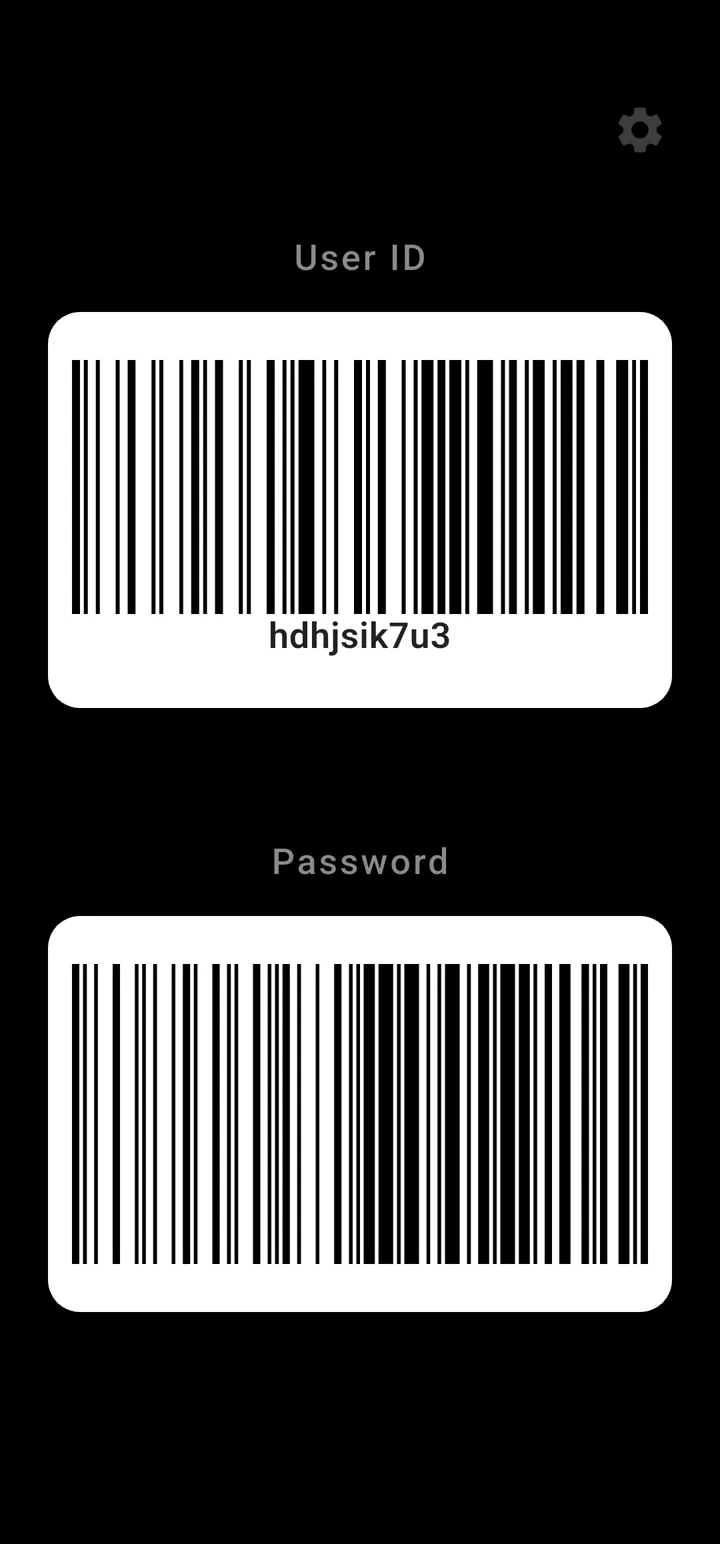
Scan Login exists for that moment. Save the details you already type, show them as barcodes, scan with the handheld, and get back to work without keying everything in again.
The important detail is that this is not an identity platform. It does not replace workplace security, change scanner permissions, or connect to employer systems. It is a small utility for a very specific repeated action: turning values that a worker already has permission to type into barcode images that a compatible scanner can read.
That narrow scope is the reason the tool is useful. It does not try to become a warehouse management system. It removes one irritating delay in the middle of work that already has enough friction.
What the studio built
Scan Login is a barcode utility for Android, listed on the
Google Play Store
. It turns the values you enter into barcode images that a compatible handheld scanner can read, with Code 128, Code 39, and QR Code formats available.
Because the awkward moments rarely happen at a desk, the barcode does not live only inside the app. A persistent notification, a Quick Settings tile, widgets, and an optional NFC launch all give a faster route to the barcode screen, including on dashboard-mounted phones.
The app is designed around shift behaviour rather than app-store theatre. The barcode needs to appear quickly, be readable under imperfect lighting, and then get out of the way. Settings let the user choose the barcode format, adjust display behaviour, add suffix handling where the local scanner setup expects it, and lock the barcode screen during use so a stray touch does not interrupt the scan.
The design decision that matters
Scan Login is deliberately local. There is no Scan Login account, no cloud sync, no advertising profile, and no connection to any employer scanner estate, warehouse system, or workplace login service. The values you enter stay on the device, and moving to a new phone is handled by an encrypted QR backup protected by a passphrase you choose.
That shape was a choice, not a shortcut. A login helper earns trust by holding as little as possible, and a workplace utility earns it by saying plainly what it does not do.
Local-first design also changes the support promise. If an app does not run a cloud account, there is no remote password reset button. That is why the backup path matters. A passphrase-protected encrypted QR backup gives the user a way to move their saved values to a new phone without asking the app to store those values centrally.
The privacy position is simple enough to explain in one sentence: Scan Login keeps the values on the device unless the user chooses to make an encrypted backup. That is easier to trust than a complicated cloud story.
The access problem
The barcode is only useful if it can be reached quickly. Opening an app drawer, searching for an icon, waiting for a screen, and finding the right value is too slow when the scanner has timed out and the work queue is still moving.
That is why the app exposes several access surfaces:
- A persistent notification for quick launch during a shift.
- A Quick Settings tile for users who prefer system-level shortcuts.
- Home-screen widgets for fixed routines.
- Optional NFC launch for dashboard-mounted or station-based phones.
None of those surfaces changes the security model. They simply reduce the number of taps between "the scanner logged me out" and "I can scan the barcode".
The compatibility boundary
Barcode utilities live in the real world, so compatibility has to be treated honestly. Different scanners, keyboards, suffix settings, security policies, screen brightness levels, and barcode formats can affect results. Code 128, Code 39, and QR Code cover common cases, but no public utility should pretend that every scanner estate behaves the same way.
That is why the app wording avoids promising universal compatibility. A good tool should help quickly when it fits, and be clear when local setup still matters. The terms page says this plainly because it is better for a user to test the app with their own scanner than to rely on vague certainty.
What it demonstrates
The build approach is the same one the studio applies to client work. Start from the real working conditions: gloves, cold areas, shared scanners, and repeated timeouts. Scope the tool to one job and do it properly, with lock and logoff options for barcodes that should not stay visible, and settings for barcode format, display, suffix, and shift-lock behaviour. Then be honest about limits: barcode behaviour depends on the scanner and the local setup, and the terms page says so in plain English rather than promising universal compatibility.
The same thinking applies beyond barcode apps. A useful internal tool usually does not need to be huge. It needs to be close to the repeated job, careful about data, clear about limits, and fast enough that people use it while they are under pressure.
What shipped
- An Android barcode utility on the Google Play Store with Code 128, Code 39, and QR Code formats.
- Quick-access surfaces: persistent notification, Quick Settings tile, widgets, and optional NFC launch.
- Local-first storage with a passphrase-protected encrypted QR backup and plain-English privacy and terms pages.
The business lesson
Small operational tools are easy to underestimate because they do not look like big software projects. But if a repeated delay happens several times per shift, across many workers, in a pressured environment, the value of removing it adds up quickly.
The lesson from Scan Login is not "every login should become a barcode". The lesson is that useful software starts with watching where real work catches. Sometimes the best build is a narrow tool that gives a worker two minutes back at exactly the right moment.
Related capability
Web Apps & Dashboards
Bespoke operational tools for teams ready for a focused interface beyond generic SaaS.